Over the past month, my daughter Charleigh and I have run 52 free website assessments for service businesses across North Carolina.
Plumbers, electricians, HVAC companies, landscapers, waste management companies… you name it.
And here's what surprised me: it's not the businesses with ugly websites that struggle. It's the ones making these three specific mistakes.
Most have decent-looking sites. Some even paid thousands for professional design. But they're still not getting customers from their website and here's why.
MISTAKE #1: You're Invisible in the Markets You Actually Serve
You serve Charlotte, but your website is optimized for Huntersville. You cover the greater Wilmington area, but you only rank for "Southport." I see this in about 30% of the assessments we run.
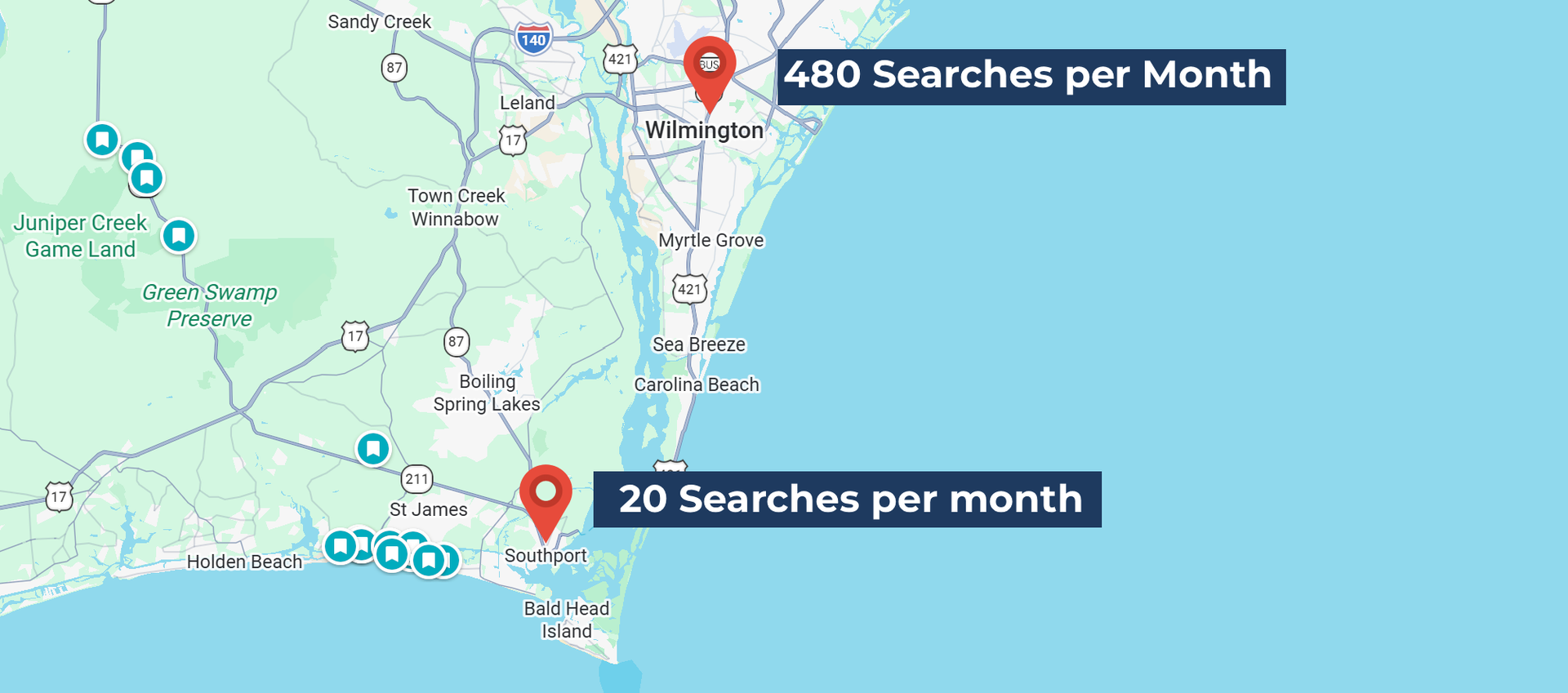
Let me show you what this looks like in practice. A waste management company in Southport came to me frustrated because their competitors were getting more business and they couldn't figure out why. Their website looked professional. Their services were solid. Their prices were competitive but when I pulled the numbers, here's what I found:
- "Wilmington dumpster rental" - 480 searches per month
- "Southport dumpster rental" - 20 searches per month
- "Wilmington junk removal" - 390 searches per month
- "Southport junk removal" - 10 searches per month
They were invisible for 96% of the searches in their own market.
This isn't just a Wilmington problem. I see it constantly across North Carolina:
- Huntersville contractors missing Charlotte searches
- Mooresville HVAC companies missing Lake Norman searches
- Davidson plumbers missing Charlotte searches
Here's why this happens: You're physically located in the smaller town, so naturally you optimize for that town. You put "Huntersville HVAC" in your page titles. You write "Serving Huntersville and surrounding areas" on your homepage.
But your customers don't search that way. When someone in Huntersville needs an HVAC repair, they don't Google "Huntersville HVAC." They Google "Charlotte HVAC" because that's their mental map of the region.
Google doesn't automatically connect the dots. Just because you're a Huntersville business doesn't mean you'll rank for Charlotte searches. You have to explicitly tell Google, and your customers, that you serve the Charlotte market.
The fix is straightforward:
- Update your homepage to say "Serving Charlotte, Huntersville, and the greater Lake Norman area"
- Revise your meta descriptions to include both your town AND the metro area
- Create a service area page listing all the communities you serve
- Update your Google Business Profile service area to include the larger metro
I covered this problem in depth in my last post, including exactly how to update your Google Business Profile and create location-specific content. You can
read the full breakdown here.
This means you're missing 80-95% of potential searches in markets you already serve.
MISTAKE #2: Your Website Overwhelms Visitors (And Your CTAs Don't Work)
Your site looks expensive. Lots of animations, sliding carousels, fancy graphics. But when I land on it, I have no idea where to look or what to do next.
Then when I finally find the "Contact Us" button... it's broken.
I tested contact forms and CTAs across those 52 websites. A surprising number had broken contact forms, CTAs that went nowhere, or made me hunt just to figure out how to get in touch.
And the photos? Either blurry cell phone pictures that look unprofessional, or obvious stock photography of people who clearly don't work for your company. I've seen pages with a blurry cell phone photo of the actual truck next to a stock image of a model in a hard hat who's clearly never held a wrench in her life. The whole thing just looks... off. Like you couldn't decide if you wanted to be authentic or professional, so you did both badly.
Designers focus on "looking professional" instead of "converting visitors." They add complexity thinking it looks more premium. But overstimulated visitors just leave.
Here's what I see constantly:
- Auto-playing videos that slow down the page
- Rotating hero images with 5 different messages (pick one!)
- Buried contact info (I shouldn't have to scroll to find your phone number)
- Forms that require too much information before someone can even talk to you
- CTAs that say "Learn More" instead of "Get a Quote" or "Schedule Service"
- Contact forms that simply don't work
The fix is simpler than you think:
- Clear headline above the fold - what you do, for who, in what area
- One primary CTA above the fold - "Call Now" or "Get Free Estimate"
- Phone number visible at the top of every page
- Test your forms - actually fill them out yourself and make sure they work
- Simplify ruthlessly - remove anything that doesn't help someone decide to contact you
- Use real photos of your team, your work, your trucks - even phone photos are better than fake stock images
- Simplify ruthlessly - remove anything that doesn't help someone decide to contact you
Even the traffic you do get will bounce if they're confused or your contact form doesn't work.
MISTAKE #3: Your DIY Platform Is Working Against You
You built your site on Google Sites, Wix, or basic WordPress because it was free or cheap. Now you're wondering why you're not ranking.
I see this pattern constantly: Business owner builds their own site, it looks decent but doesn't rank, they spend months tweaking settings, it still doesn't rank, and eventually they reach out for help.
Often, the platform itself is the problem.
DIY platforms struggle because of limited technical SEO capabilities, slower load times (especially on mobile), restrictive templates that hurt mobile optimization, and an inability to implement proper schema markup. I've even found sites where the template code still had a completely different business name buried in it because the owner didn't know how to fully customize the template. Google Sites is the worst. It was built for companies to share internal documents with employees, not for businesses trying to show up when someone Googles 'plumber near me.
This one's harder to fix because it often means rebuilding, but here are your options:
- Migrate to a proper platform (we use Duda for clients, but even properly hosted WordPress works)
- Hire someone who knows how to properly optimize your DIY platform
- At minimum: test your mobile speed using
Google PageSpeed Insights and fix what it flags
You're fighting with one hand tied behind your back. Your competitors on better platforms will outrank you even with better content.
The Pattern I See
Most struggling websites have at least two of these three problems. Some have all three.
The good news? All three are fixable.
You don't need a total redesign or a $10,000 rebuild. You need better keyword targeting for your actual service area, simpler design with working CTAs, and a platform that doesn't fight against your SEO efforts.
Check Your Own Site
Not sure if your site has these issues? Here's a quick self-audit:
Location Keywords: Pull up
Google Keyword Planner. Compare search volume for "[your town] + [your service]" versus "[nearest big city] + [your service]". If there's a 5x or bigger difference, you're missing searches.
Visitor Experience: Ask someone not in your industry to visit your site and tell you what you do? Where you serve? How to contact you? If they hesitate on any answer, you have a clarity problem.
CTAs: Actually fill out your own contact form. Call your own phone number. Does everything work? Is it easy?
Platform Performance: Run your site through
Google PageSpeed Insights. If your mobile score is under 50, your platform is hurting you.
Want to Know Where Your Gaps Are?
Not sure if your website is losing you customers? I run free assessments for North Carolina service businesses. I'll show you exactly where your gaps are and what to fix first.